
UART and Utility Modes
Send and receive
Add UART, match the target baud rate (default 115200), connect TX/RX/GND according to the hardware specification, and start. A USB virtual COM port does not establish the target's electrical interface.
In UART Trace, select all channels or one channel. Hex displays bytes; Abc displays text. Choose a transmit channel and format, enter a payload, and send.
AA 55 01 in Hex sends three bytes. AT in Abc sends text. Select the required CR/LF ending. Endings are also appended to Hex payloads; choose no append for an unchanged binary frame.
Save exports the visible channel's cached records. Use a UART Logger for long captures.
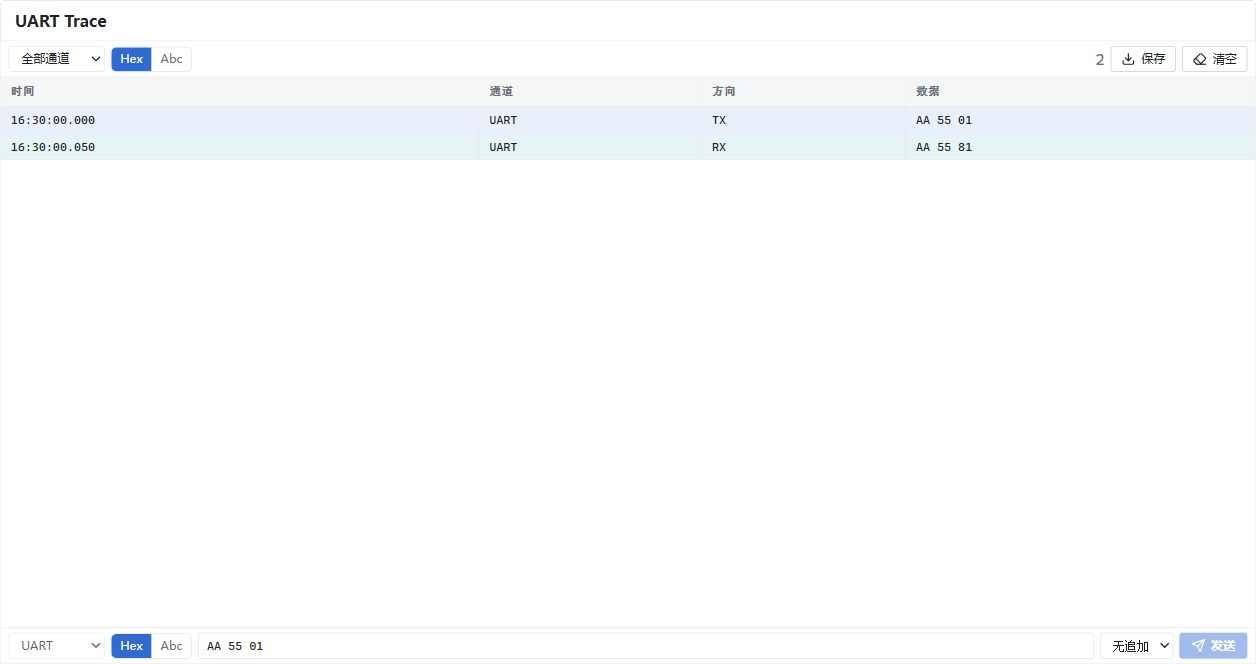
Illustrative UART data: TX AA 55 01 and RX AA 55 81. Choose channel, encoding and line ending at the bottom. Chinese UI; not a hardware capture.
Uart2CAN and Uart2LIN
These modules enter the corresponding bridge's UART utility mode. View and send their bytes in UART Trace, not the protocol Trace or CAN/LIN senders. CAN excludes Uart2CAN; LIN excludes Uart2LIN. Stop and remove the original module before switching modes.
UART Sender and COM tool
UART Sender supports 32 rows with channel, format, Manual/Periodic trigger, and a 1–65535 ms period. Manual sends once; periodic send toggles a host timer. Channel closure or stopping measurement stops its timer.
Schedule rows append no line endings. Include 0D/0A in Hex when required, or use UART Trace's ending selector for a single send.
Tools → COM opens a separate serial debug tool. Release other sessions before opening the same port and rescan after reconnection.