
Log Replay
Add a replay in Bus Configuration, choosing an ASC/BLF file, name, mode, speed, and repeat count.
| Setting | Effect |
|---|---|
| Offline | Feed frames into software Trace/graphs without transmitting on the bus |
| Online | Transmit supported frames through the current open interfaces |
| 0.5×, 1×, 2×, 5×, 10× | Scale original inter-frame spacing |
| As fast as possible | Skip timing waits |
| 1, 2, 5, 10 times, until stopped | Repeat until the selected count or Stop |
Select Offline on Home and start without a device. All offline replays with a path start automatically; online entries are skipped. Measurement stops when all replays finish, while an endless replay must be stopped manually. During measurement, offline entries can be stopped and started individually. In Online mode, start measurement and play entries manually.
Offline sessions do not run simulation, scripts, or variables and do not transmit. An enabled bus Logger records replay frames. Statistics show offline counts and ID periods separately from device statistics and physical bus load. Periods use log time; frames per second reflect playback speed.
Before online replay, open matching CAN/LIN modules, disable CAN listen-only, use LIN master mode, and match bus rates. Stop unrelated simulation and cyclic traffic.
Remote/error CAN frames and unsupported records are skipped. There is no multi-channel mapping: records of each bus type use the selected device's corresponding interface. LIN online playback sends data frames, not the original header/response interaction.
Standalone offline sessions retain relative log time regardless of playback speed. Repeated passes have a 1 ms gap. An offline replay started manually during an online session uses host arrival time. In standalone offline sessions, concurrent replays each start at zero and Trace lists arrival order, so times can go backwards; recording them into one Logger can also produce non-monotonic times. Their timelines are not merged. Playback speeds are not hard real-time guarantees. Projects store replay configuration and paths, not the original files. Inspect Information for parse, connection, or transmission failures.
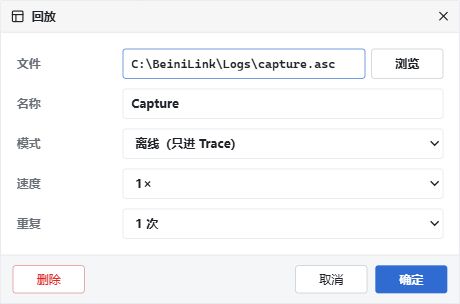
Offline replay example: Trace only, 1× speed, one repeat. Chinese UI.