
Python Scripts and REPL
Python runs simple scripts through the REPL on the BeiniLink MCU, not on the host computer. Supported machine APIs depend on firmware.
When Python is enabled, Start opens only Python. Stop and disable it before using normal protocol modules.
First script
Add Python using the usual 115200, 8N1 settings, start measurement, and run:
import machine
print("BeiniLink REPL")
machine.version()
Run all or run selected code, use the single-line command input, or insert examples from API groups. Inspect output and exceptions in the console; successful command delivery is not successful script execution.
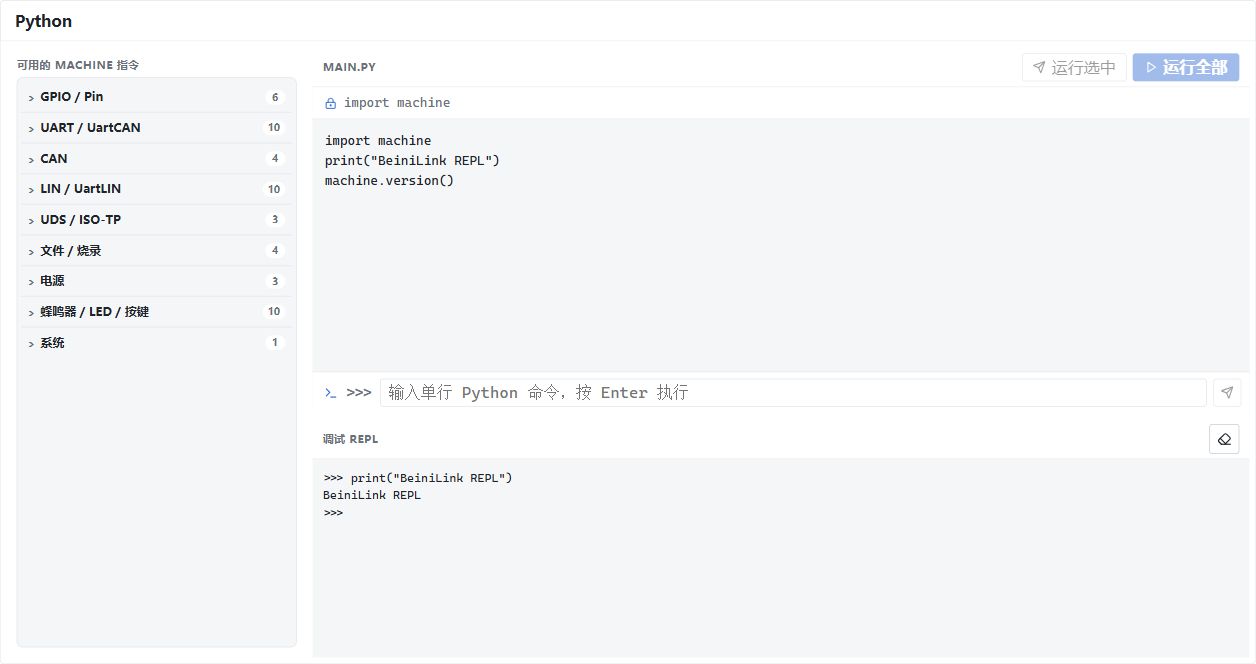
The Python window includes the machine API list, editor and REPL. Chinese UI, with illustrative console text.
Persistence and control
Editor contents are saved in local application storage, not embedded in .blproj. Keep scripts separately when sharing a project. Running editor code does not create main.py on the device.
Startup scripts and device files are separate firmware workflows. Verify short scripts before enabling automatic execution and follow the matching firmware API documentation for pins and resources.
Clearing the console does not interrupt code. Blocking loops may stop REPL responsiveness. Software reset requires a working MCU control loop and USB connection and cannot guarantee recovery of an unresponsive device.