
CAN and CAN FD
Hardware setup
Select the nominal bitrate: 10, 20, 50, 100, 125, 250, 500, 800 kbit/s, or 1 Mbit/s. FD data-rate choices are 2, 4, 5, and 8 Mbit/s. Select classic CAN when FD is unnecessary.
Listen-only observes traffic without normal transmission or ACK participation. Match wiring, reference ground, termination, and bitrate before testing.
Manual frames
Open CAN Sender, add a frame with the envelope icons (ID for classic CAN, FD for CAN FD), and enter the hexadecimal ID, DLC, bytes, and Manual trigger. Start measurement and send the row.
IDs are hexadecimal even without 0x. Standard IDs end at 0x7FF; larger IDs use extended format, up to 0x1FFFFFFF. DBC messages can specify extended format explicitly.
The current editor uses 8-byte classic CAN rows. FD rows support DLC 8–15:
| DLC | 8 | 9 | 10 | 11 | 12 | 13 | 14 | 15 |
|---|---|---|---|---|---|---|---|---|
| Bytes | 8 | 12 | 16 | 20 | 24 | 32 | 48 | 64 |
Reception can display other legal lengths. Enter complete hexadecimal bytes matching the DLC. Current manual FD schedule frames do not enable BRS; selecting an FD data rate alone does not enable bitrate switching for every frame.
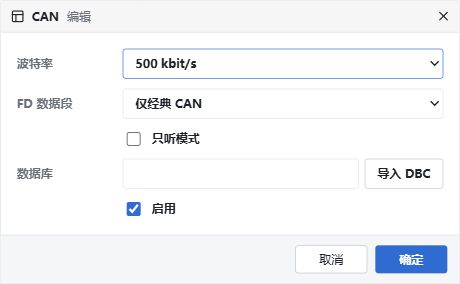
Classic CAN example: 500 kbit/s, listen-only disabled. Chinese UI.
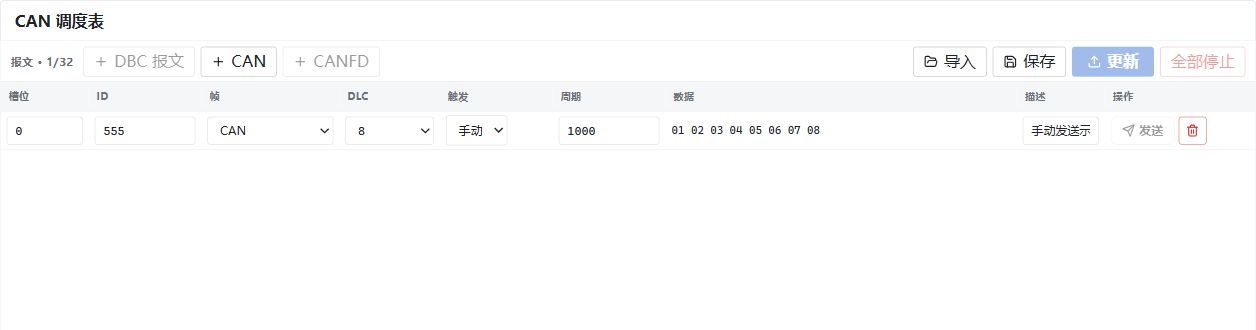
Manual transmission example: ID 555 and eight data bytes. Send is disabled while measurement is stopped. Chinese UI.
Periodic frames
Up to 32 rows, with periods of 1–65535 ms. A periodic row's send action starts or stops that row. Update applies the latest periodic rows; manual rows are not transmitted by Update.
Stop all stops every periodic row in CAN Sender. Database simulation may still send; Stop measurement ends all measurement tasks.
CAN periodic transmission is currently timed by the host, not guaranteed hard real-time. Compare MCU TX timestamps or an external analyzer's timestamps, not Information arrival times.
Attach a DBC to add database messages with the DB envelope icon and edit signals or raw bytes. Changing payloads does not modify the DBC. Save/import .blcan for rows, and save .blproj for the complete project.